
hoodro
You May Also Like

1
Where does the bug appear (feature/product)?
Background Agent (GitHub, Slack, Web, Linear)
Describe the Bug
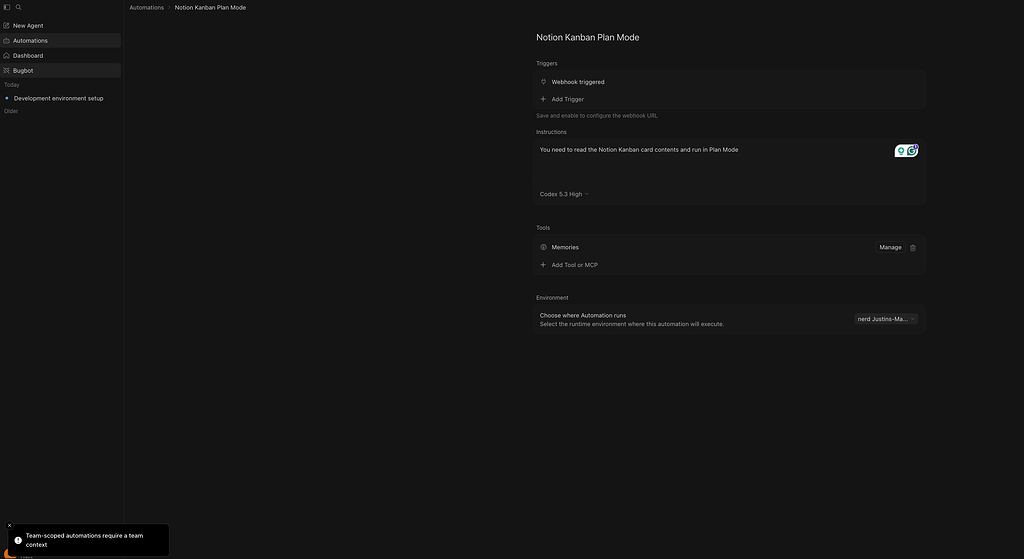
I’m setting up an Automation on my Ultra Plan (not Team or Enterprise), but when I select “My Machine” from the Environment dropdown, it doesn’t allow you to save it.
It shows a “Team-scoped automations require a team context” error in the bottom left.
I have tried this with “Enable self-hosted pool” setting enabled and disabled under Cloud Agent Settings.
There is nothing in the documentation that indicates using a self-hosted agent (not a Pool) is related to Team. The self hosted agent works fine in the Web UI to trigger new sessions.
Steps to Reproduce
Try to save an Automation with an active “My Machine” configured (running agent command on local machine) on Ultra plan (not Team or Enterprise)
Expected Behavior
I can save the Automation
Screenshots / Screen Recordings
Operating System
MacOS
Version Information
CLI Version 2026.04.17-787b533
Model Auto
Subscription Tier Ultra
OS darwin (x64)
Terminal vscode
Shell zsh
Does this stop you from using Cursor
Sometimes – I can sometimes use Cursor
Thanks for the detailed report and I’m sorry for this unexpected bug. This is something that I have replicated and confirmed myself.
We’ve raised a bug report and are tracking occurrences. On individual plans (Pro/Ultra), the web “Create automation” flow defaults the automation scope to a team-scoped value, which the backend then rejects with the Team-scoped automations require a team context error you’re seeing. The “Enable self-hosted pool” toggle doesn’t change anything because the failure happens before the environment selection is evaluated.
Unfortunately I don’t have a clean workaround at the moment for persisting a self-hosted Automation today — ad-hoc self-hosted runs from the Web UI still work as you noted, but saving them as an Automation will hit the same error path until the fix ships.
I’ve linked your report to the internal ticket, so it’s covered alongside the other reports of this. We’ll follow up here once a fix is out.
